
Packer and Terraform
I have Terraform provisioning my EC2 instances, and Packer building AMIs, but how do you get those AMI's onto the EC2 instances Terraform deployed? ....and without copy and pasting the AMI IDs Packer spits out into my terraform files. I want to automate this!
Here is my first attempt at a quick solution:
Create a file called bastion.json:
{
  "variables": {
    "aws_access_key": "",
    "aws_secret_key": ""
  },
  "builders": [{
    "type": "amazon-ebs",
    "access_key": "{{user `aws_access_key`}}",
    "secret_key": "{{user `aws_secret_key`}}",
    "region": "us-west-1",
    "source_ami_filter": {
      "filters": {
      "virtualization-type": "hvm",
      "name": "ubuntu/images/*ubuntu-xenial-16.04-amd64-server-*",
      "root-device-type": "ebs"
      },
      "owners": ["099720109477"],
      "most_recent": true
    },
    "instance_type": "t2.micro",
    "ssh_username": "ubuntu",
    "ami_name": "stage-bastion {{timestamp}}"
  }],
  "provisioners": [
    {
      "type": "shell",
      "inline": [
        "sudo apt-get install -y ruby-full build-essential",
        "sudo apt-get update -y",
        "sudo apt-get install -y rubygems",
        "sudo gem install lolcat"
      ]
    }
  ]
}
The image is mostly copied from here. The only thing I changed was the region and the ami_name and I added a provisioners section:
{
  "provisioners": [
    {
      "type": "shell",
      "inline": [
        "sudo apt-get install -y ruby-full build-essential",
        "sudo apt-get update -y",
        "sudo apt-get install -y rubygems",
        "sudo gem install lolcat"
      ]
    }
  ]
}
This installs the extremely important lolcat
Validate our packer syntax:
packer validate bastion.json
Build our AMI:
Note: You will have to add your personal keys to the script below
packer build \
  -var "aws_access_key=$AWS_ACCESS_KEY" \
  -var "aws_secret_key=$AWS_SECRET_KEY" \
  bastion.json | tee packer_output.txt
Extract out the AMI ID and save it to a packer_ami.tfvars file:
cat packer_output.txt | tail -n 2 \
  | sed '$ d' \
  | sed "s/us-west-1: /packer_built_bastion_ami = \"/" \
  | sed -e 's/[[:space:]]*$/\"/' > packer_ami.tfvars

  cat packer_ami.tfvars
Steps this script takes:
- prints out the result of the packer build
- grabs the last 2 lines of output
- strips out the last blank line
- replaces our region "us-west-1" with our variable name "packer_built_ami"
- strips out the trailing white space, and closes the quotes
- outputs the result to a file called packer_ami.tfvars
The packer_ami.tfvars file should look this:
packer_built_bastion_ami = "ami-c6af5bcd"
Altogether in a script build_ami.sh:
#!/usr/bin/env bash

set -e

packer build \
  -var "aws_access_key=$AWS_ACCESS_KEY" \
  -var "aws_secret_key=$AWS_SECRET_KEY" \
  bastion.json | tee packer_output.txt

cat packer_output.txt | tail -n 2 \
  | sed '$ d' \
  | sed "s/us-west-1: /packer_built_bastion_ami = \"/" \
  | sed -e 's/[[:space:]]*$/\"/' > packer_ami.tfvars

cat packer_ami.tfvars
Add code for the dynamic AMI in Terraform:
Note: The rest of the code for this Bastion can be found here
resource "aws_instance" "bastion" {
  ami = "${var.packer_built_bastion_ami}"
  # ...
}

variable "packer_built_bastion_ami" {}
Apply your terraform changes with the newly Created AMI:
terraform plan -var-file=packer_ami.tfvars
Now when you SSH onto your bastion:
ssh -i ~/.aws/you_key_name ubuntu@43.33.124.124
Note: Your key name and IP address will be different. For more information about this setup, read here
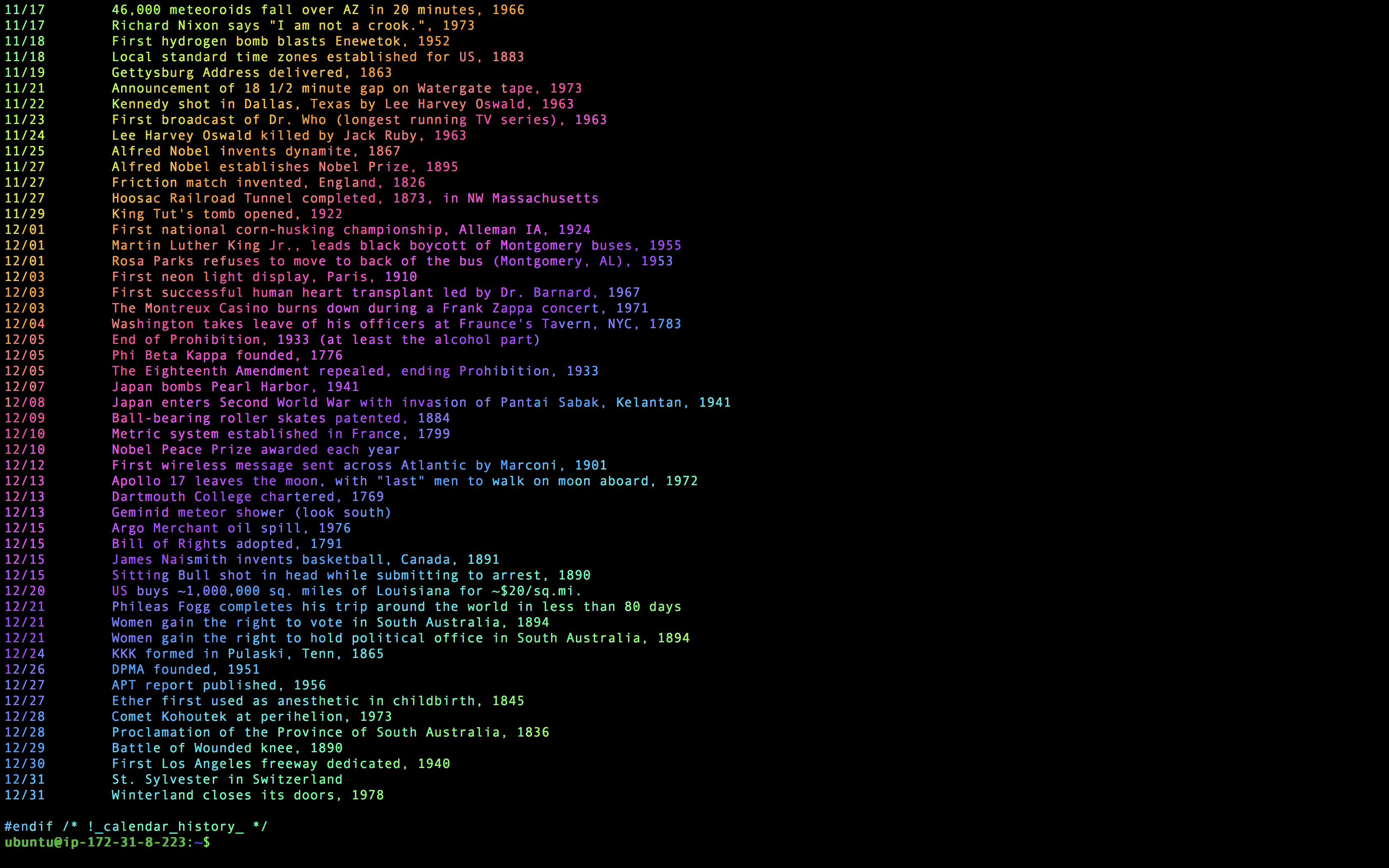
And then I can finally see all the important events in a rainbow, without the tedious installation time!
cat /usr/share/calendar/calendar.history | lolcat
TLDR
Add These Files
main.tf
provider "aws" {
  region = "us-west-1"
}

variable "packer_built_bastion_ami" {}

resource "aws_default_vpc" "default" {}

resource "aws_instance" "bastion" {
  ami                         = "${var.packer_built_bastion_ami}"
  key_name                    = "${aws_key_pair.bastion_key.key_name}"
  instance_type               = "t2.micro"
  security_groups             = ["${aws_security_group.bastion-sg.name}"]
  associate_public_ip_address = true
}

resource "aws_security_group" "bastion-sg" {
  name   = "bastion-security-group"
  vpc_id = "${aws_default_vpc.default.id}"

  ingress {
    protocol    = "tcp"
    from_port   = 22
    to_port     = 22
    cidr_blocks = ["0.0.0.0/0"]
  }

  egress {
    protocol    = -1
    from_port   = 0
    to_port     = 0
    cidr_blocks = ["0.0.0.0/0"]
  }
}

resource "aws_key_pair" "bastion_key" {
  key_name   = "your_key_name"
  public_key = "ssh-rsa AAAAB3NzaC1yc2EAAAADAQABAAACAQDWbz6ur89BKQ+am87EovJsv6g9QpbOiw13lTF7Kw1StbQAmkcGGrNTK2LIWsP3cQf+P+gptRAJbuqB1jQKZ283TwwREIv+l5AMKrbEkanOF4zsc8a9zitejlOLvVUxtVoMi5ROVYD2dLKjqAbDtqIC9LmMD+hcpqcXLhS6t+HVSVI862dTNVFY1EGukLGQ3IEJfw5v7FDzLn72NsuUiXEeCZu8DtlXLCTYRnqv+XkJQWVocPdFDUWISSIQ0CTFu+GJvJjdqDyAhYo3it7Eybj6XuSgLDwkQcNU45Ewz4Nn7LwV+f4Av8D25m4FZOfpWaj5+q9Fc9nRdIsB7P0oFgj5YoaTngQKy27MJ5UppMO7OOhriurJ/PBOrGpeqPcftWKLpcHLIGrm3ndoDKQx12R1s0gyYpA4JuNUWHYcxNrFa2rs/6AoFuS7wNUmM+DYB8iTjOl6dT8dS5AgMxGoZ3NepMPYilw1gf+gw9Ft3pHs2IMfDfqwZpXga8KdYwxBmRakpHdA7Nzje8ufvP/TBawsqVcW7z5gG9uPhYtfnYYezSIxv56PMSWEfqchkz+raPsElzIGtPcC1snncQlau95utV25r88BzXhCMJwNy9aDNEfSrm5SORlA97xicroCOuRjw2PnQyIXKvWDZtyqX5799x37K/HDYpJnvcgwpTlDZQ== your_email@example.com"
}

output "bastion_public_ip" {
  value = "${aws_instance.bastion.public_ip}"
}
bastion.json
{
  "variables": {
    "aws_access_key": "",
    "aws_secret_key": ""
  },
  "builders": [
    {
      "type": "amazon-ebs",
      "access_key": "{{user `aws_access_key`}}",
      "secret_key": "{{user `aws_secret_key`}}",
      "region": "us-west-1",
      "source_ami_filter": {
        "filters": {
          "virtualization-type": "hvm",
          "name": "ubuntu/images/*ubuntu-xenial-16.04-amd64-server-*",
          "root-device-type": "ebs"
        },
        "owners": [
          "099720109477"
        ],
        "most_recent": true
      },
      "instance_type": "t2.micro",
      "ssh_username": "ubuntu",
      "ami_name": "stage-bastion {{timestamp}}"
    }
  ],
  "provisioners": [
    {
      "type": "shell",
      "inline": [
        "sudo apt-get update -y",
        "sudo apt-get install -y ruby-full build-essential",
        "sudo apt-get install -y rubygems",
        "sudo gem install lolcat"
      ]
    }
  ]
}
build_ami.sh
#!/usr/bin/env bash

set -e

packer build \
  -var "aws_access_key=$AWS_ACCESS_KEY" \
  -var "aws_secret_key=$AWS_SECRET_KEY" \
  bastion.json | tee packer_output.txt

cat packer_output.txt | tail -n 2 \
  | sed '$ d' \
  | sed "s/us-west-1: /packer_built_bastion_ami = \"/" \
  | sed -e 's/[[:space:]]*$/\"/' > packer_ami.tfvars

cat packer_ami.tfvars
Run these scripts
export AWS_ACCESS_KEY=<YOU PERSONAL AWS ACCESS KEY GOES HERE>
export AWS_SECRET_KEY=<YOU PERSONAL AWS SECRET KEY GOES HERE>
chmod +x build_ami.sh
./build_ami.sh
terraform init
terraform apply -var-file=packer_ami.tfvars
Profit!
ssh -i ~/.aws/you_key_name ubuntu@43.33.124.124
cat /usr/share/calendar/calendar.history | lolcat